
Email setup guide
Configuring Apple Mac mail
Step 1: Open the MacMail E-Mail application.
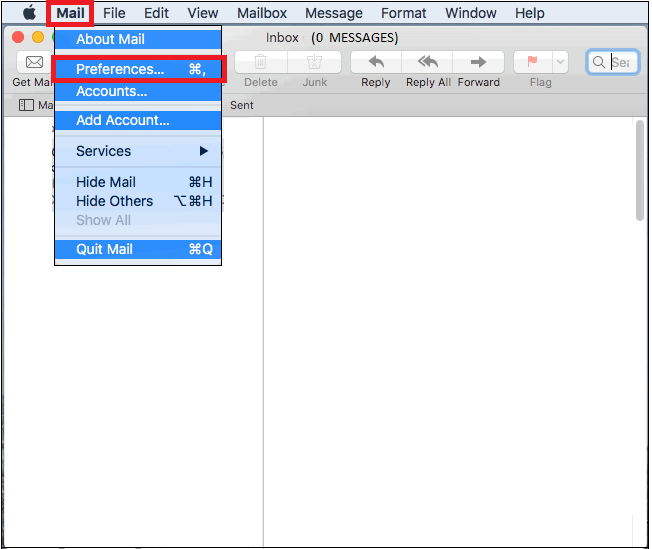
Step 2: In the heading menu, select “Mail” followed by “Preferences”
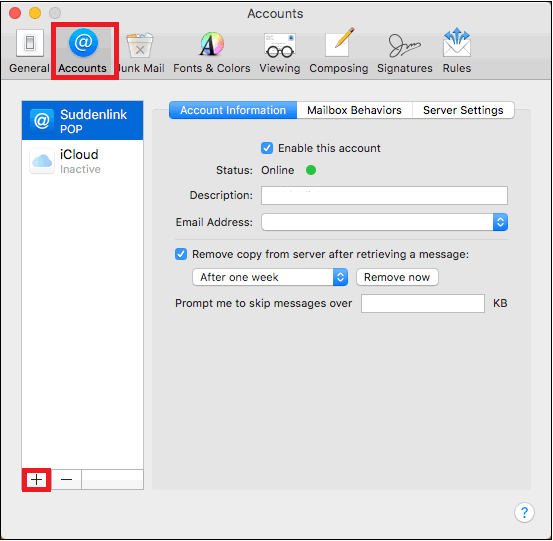
Step 3: Under the “Accounts” tab, click on the “+” symbol on the bottom left panel of the window.
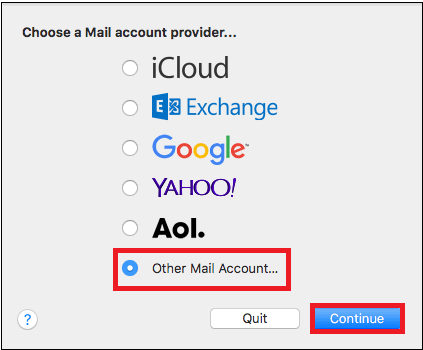
Step 4: As we wish to set up your activ8me account, select “Other Mail Account” followed by “Continue”.
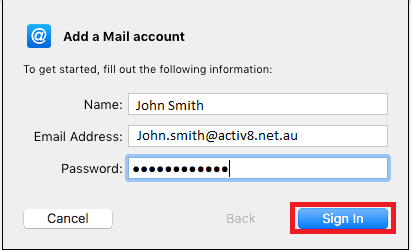
Step 5: Complete Form with the following information
User Information
Your Name: {First name and Surname}
E-mail Address: {Your activ8me E-mail address}
Password: Provided by activ8me
(To change password Click Here)
User Information
Your Name: {First name and Surname}
E-mail Address: {Your activ8me E-mail address}
Password: Provided by activ8me
(To change password Click Here)
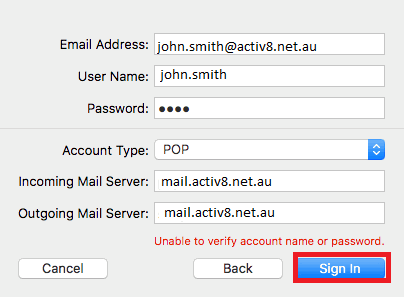
Step 6: Once you “Sign In” you will be prompted to choose account type.
Complete Form with the following information
User Information
E-mail Address: {Your activ8me E-mail address}
Your Name: {First name and Surname}
Logon Information:
Password: Provided by activ8me
(To change password Click Here)
Server Information
Account Type: POP
Incoming mail server: mail.activ8.net.au
Outgoing mail server (SMTP): mail.activ8.net.au
Complete Form with the following information
User Information
E-mail Address: {Your activ8me E-mail address}
Your Name: {First name and Surname}
Logon Information:
Password: Provided by activ8me
(To change password Click Here)
Server Information
Account Type: POP
Incoming mail server: mail.activ8.net.au
Outgoing mail server (SMTP): mail.activ8.net.au
Step 7: If all steps were completed correctly, the mail client will be ready to use.