logo
  • Home
Call Us Now

Knowledge Base

  1. Home
  2. Knowledge
  3. Change Your Plan

Change Your Plan

In the ‘home’ area of Activ8me’s member’s area, you can see a list of your services. Click the ‘view’ button next to the service you want to change the plan of.
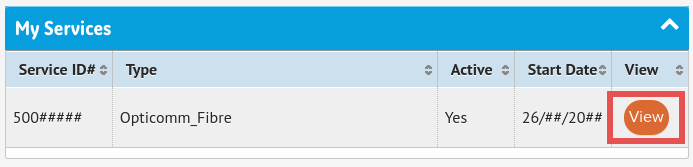
This will open up the service summary page and show an overview of your service. You can find a detailed explanation of this page in our ‘Members Area Guide’.

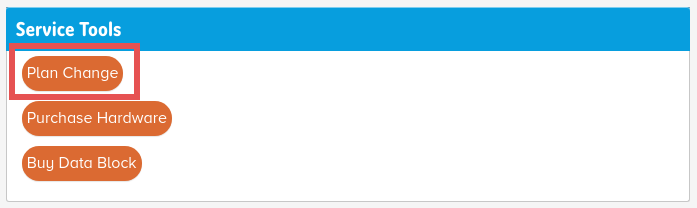
To change your plan, click on Plan Change in the Service Tools menu
You’ll now see details of your current plan, have the ability to select a new plan and select a date for it to take effect.
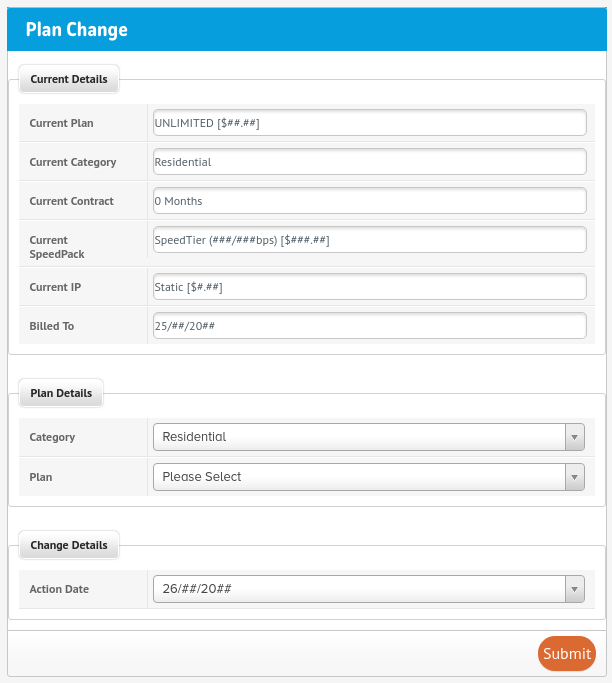
A list of all available plans and pricing will display within the Plan Details section.

Begin by selecting your new plan from the dropdown menu.
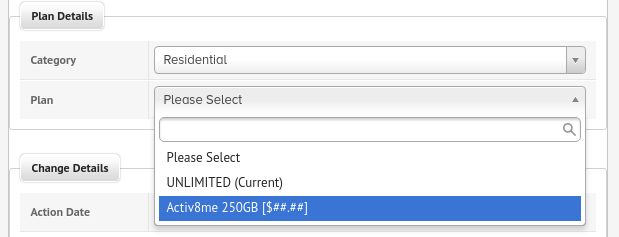
After you’ve chosen your new plan you also need to select a Speed Pack for the plan. You’ll be able to review your new plan and pricing before submitting the request.
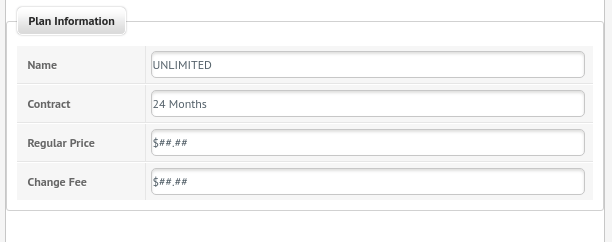
When you are satisfied, select the date you want the plan change to be actioned and click Submit.

Activ8me

Empowering Regional Australia with great value, innovative internet and phone services

Awardsnbnopticomm

Services

  • nbn® Sky Muster®
  • nbn® Fibre
  • nbn® Fixed Wireless
  • Opticomm Fibre
  • Phone
  • Business Services

Help & Support

  • Help Centre
  • Speed Test
  • Network Disruptions
  • Report a Scam Call
  • Natural Disaster Assistance
  • Members Area
  • Webmail

Policies & Legal

  • Terms & Conditions
  • Privacy Policy
  • Payment Assist Policy
  • Complaints Handling Policy
  • Outage Communications Policy
  • Network Outage Complaints
  • Domestic/Family Violence
  • Security Assurance Statement
  • Online Safety & Filtering

About

  • About Us
  • Blog
  • Media
  • Site Map
  • Contact Us

Follow Us

FacebookXLinkedInInstagram
© 2026 Australian Private Networks Pty. Ltd.
All rights reserved.